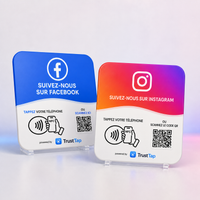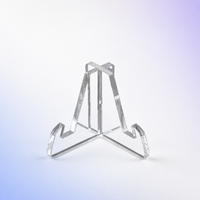
Support pour plaque TrustTap (Plate Stand)
$5.00
 Livraison en 48 heures·
Conçu au Québec


 Un seul paiement. Aucun abonnement.
 NFC et QR code, sans application à télécharger.
 Configuration guidée et assistance TrustTap.

Approchez un téléphone compatible NFC ou scannez le QR code. Le client arrive directement sur la destination configurée pour votre entreprise.
Les commandes sont préparées sous 1 à 2 jours ouvrables. La livraison prend ensuite environ 2 jours ouvrables au Canada, 8 jours ouvrables aux États-Unis et 10 jours ouvrables en Europe. Le suivi est envoyé par courriel.
Essayez votre solution TrustTap pendant 30 jours en toute tranquillité.
Turn happy customers into new Google reviews in seconds.
TrustTap Google Review Cards make it easy for customers to reach your Google review page. They simply tap their phone on the NFC card or scan the QR code — no app required.
Perfect for counters, reception desks, checkout areas, salons, restaurants and other local businesses.
• NFC + QR code technology
• Direct access to your Google review page
• No app required for customers
• Quick guided setup with TrustTap
• Compatible with most modern smartphones
• One-time purchase — no monthly subscription
In the box: the number of TrustTap Google Review Cards included in the selected pack, in your chosen printed language.
A Google review card removes the steps that often stop a customer from following through. Instead of searching for your business, choosing the correct location and finding the review button, they can tap the NFC area or scan the printed QR code. The card opens the review destination you provide; the customer still decides whether to post and what rating or comment to leave.
No customer app or monthly subscription is required. The QR code also provides a clear alternative when NFC is disabled or unavailable on a device.
Use the card at a checkout counter, reception desk, service desk, salon station, restaurant payment area, clinic reception or mobile service vehicle. The strongest placement is visible and close to the moment when the employee thanks the customer. Avoid hiding it behind other signage or asking a customer before the service has been completed.
NFC offers the fastest interaction on compatible phones: the customer holds the phone near the card and follows the notification. A QR code is familiar, visible and works through the camera on a wide range of devices. Combining both methods gives each customer a convenient path to the same review page.
Google allows businesses to share a review link or QR code, but reviews must represent genuine experiences. Do not offer a discount, gift or contest entry in exchange for a review, and do not direct only satisfied customers to Google. Invite every real customer to share honest feedback. Read our guide on how to get more Google reviews without breaking the rules.
No. A compatible phone can read the NFC destination, and the camera can scan the QR code.
No password is required. TrustTap only needs the public review destination for the correct business location.
No. This is a physical NFC and QR product with no required monthly subscription.
Each card should point to the correct review page for the location where it is displayed. Businesses with several locations should use a clearly identified card for each profile.
No product can guarantee a rating. The card reduces friction and makes it easier for genuine customers to share their own experience.
Pair the card with a short team script, consistent placement and personalized replies to received reviews. Compare formats in our guide to choosing the right Google review sign size, or explore regional solutions for Canada and the United States.
Le meilleur emplacement et la bonne façon de présenter une plaque varient selon le parcours client. Consultez notre guide pour les restaurants au Québec ou notre guide pour les dentistes et cliniques dentaires. Pour une stratégie provinciale plus complète, découvrez aussi les solutions avis Google pour les commerces québécois.
Les entrepreneurs généraux, rénovateurs, couvreurs et équipes de métiers spécialisés peuvent présenter la plaque à la fin du chantier ou pendant la remise des documents. Découvrez les bons emplacements, une phrase de demande sans pression et une méthode de suivi dans notre guide de la plaque avis Google pour les entreprises de construction au Québec. Consultez aussi la page Plaque avis Google Québec.
An NFC + QR review plate can support the final walkthrough, warranty handoff, or follow-up after outstanding work is completed. See our French-language guides for construction companies in Quebec and roofing contractors. The plate only shortens the path to your Google Business Profile; it does not guarantee a rating, a number of reviews, or a Google ranking.